 BitCloudVPS
How to Buy an Anonymous VPS in 2026 — Complete Walkthrough
Step-by-step: buy a VPS anonymously in 2026 — private email, Monero payment, SSH keys, DNS hygiene. From $3/mo at BitCloudVPS, 15 minutes total.
Buy an anonymous VPS in 2026: private email, Monero payment, SSH keys and clean DNS — BitCloudVPS needs only an email and a password, from $3/mo.
What “anonymous” can honestly mean
Anonymous hosting means the provider holds no identity documents and the payment trail can be private. It does not make your traffic invisible, erase DNS history, or cancel local criminal law. This page is the buying path done properly; pair it with the opsec guide and honest limits.
Business $24/mo (6 vCPU / 16 GB DDR5) is the production size. Crypto invoice, no KYC.
Launch nowSeven steps — with opsec risk per step
- Private email — Proton/Tuta alias used nowhere else. Risk if skipped: login correlates to your real identity forever.
- Access path — open checkout over Tor or a VPN if local observers are in scope. Risk: panel IP logs link home connection to account creation.
- Jurisdiction — Reykjavik or Zurich for strongest flags (see jurisdiction ranking). Risk: picking Ashburn for convenience while claiming an Eyes-exit threat model.
- Configure — plan → term → datacenter → OS (Debian 12 default). Risk: vanity hostnames and named PTR at birth.
- Pay with Monero — exact invoice amount from self-custody. Risk: BTC from an exchange = public KYC’d trail upstream.
- First login hygiene — SSH keys, disable password auth, firewall (hardening checklist). Risk: password auth left open to the world.
- DNS discipline — privacy registrar or no domain; never leak real names in records. Risk: WHOIS and historical A records outlive the VPS.
End-to-end on BitCloudVPS: about fifteen minutes after you already have a funded XMR wallet.
Payment hygiene
- Prefer Monero; BTC only from wallets you control, never from a KYC exchange withdrawal if privacy is the goal.
- Send exactly the locked invoice amount in one transfer; wallet fee is extra.
- Do not reuse invoice addresses across months.
- Separate funding wallet from spending wallet when your model is serious.
- Annual 20% off is optional — monthly rolling avoids large single-tx correlation if that matters.
Mistakes that de-anonymize buyers
- Personal Gmail as the panel login.
- Exchange-withdrawn BTC to the invoice.
- Registering the domain in your legal name with public WHOIS.
- Setting PTR to
john-laptop.example. - Posting the IP in a social profile “from my server.”
- Reusing the same XMR wallet that publicly tipped a named project.
Checkout walkthrough on BitCloudVPS (what you actually click)
Create the privacy email first - before you open the deploy page. Then open deploy over Tor or a VPN if that is in scope. Choose Starter ($6.80), Plus ($10.80), or higher; pick monthly or annual (20% off USD); select Reykjavik or Zurich; pick Debian 12 unless you have a reason not to. Set a 12-character panel password that is unique to this account.
On the invoice page select Monero. The amount locks. Scan the QR or copy address and amount into Cake, Feather, or the GUI wallet. Send exactly once. When confirmations land, the VPS is typically ready in about a minute. Copy the SSH details from the panel, add your public key, disable password authentication, and enable a default-deny firewall. Only then touch DNS.
If you need Windows instead of Linux, the same path applies with a Windows Server image in checkout - still no card, still no KYC. If you need disk more than CPU, switch kind to Storage ($24+). Dedicated metal ($79.50+) uses the identical identity and coin story with longer provision times (2-4 hours) and IPMI from the start.
After day one - renewals without re-doxxing yourself
Anonymous buying fails quietly at renewal. People reconnect from home IP to the panel, pay the next invoice from a KYC exchange, or point a named domain at the box just for testing. Keep the same discipline monthly: Tor/VPN to panel, fresh XMR invoice from self-custody, neutral PTR, no personal strings in hostnames.
Snapshots help before risky upgrades; encrypted off-box backups mean a rebuild in another of the twenty-one locations does not end the project. Check the warrant canary on a schedule. If you burned the email alias, do not fix it - open a new account and migrate. Anonymity is a chain of boring repetitions, not a single clever checkout.
One more operational detail: name the server generically in your password manager (for example, edge-rkv-01) rather than with project codenames that appear in public. Store the recovery codes for the panel 2FA offline. If you lose the email alias provider account, you may lose panel recovery - treat that mailbox with the same care as the SSH key.
Pre-flight kit before you open deploy
Assemble the kit offline first: a Proton or Tuta alias used nowhere else, a funded XMR spending wallet separated from any tip jar that bears your name, an SSH keypair generated on a hardened admin device, and a decision on Reykjavik versus Zurich. Only then open deploy over Tor or VPN if local observers are in scope.
At checkout pick Starter ($6.80) unless you already know you need 8 GB - Plus is $10.80. Debian 12, monthly term until process is stable, Monero on the invoice, exact amount once. After the ~60-second provision, spend ten minutes on keys, password-auth off, and default-deny firewall before any DNS. That order prevents the classic failure mode: a carefully private payment followed by a named PTR and a personal Gmail login.
If you already burned an identity on an earlier attempt, do not "fix" the alias - open a fresh account. Anonymity compounds from clean starts, not from patching a correlated login.
Recommended setup
Plan: Starter — $6.80/mo, 2 vCPU / 4 GB ECC. Payment: Monero. Location: Reykjavik. Total setup ≈ 15 minutes.
Budget fifteen minutes for hardening after the invoice clears: keys, firewall, unattended upgrades. Prefer monthly XMR renewals until your process is stable; annual 20% off waits when you want it. The same account later adds Storage ($24+) or dedicated ($79.50+) without inventing a KYC step that never existed.
Anonymous VPS from $3/mo — email, password, XMR.
Launch nowWhat this does not buy
Immunity from local law. Bulletproof crime hosting. Invisible traffic. A fake passport. BitCloudVPS rents KVM without documents — you still operate the machine under the AUP and criminal law that actually applies to you.
More rankings and guides
- Best anonymous VPS 2026
- Best no-email VPS
- Whonix VPS, nested virt
- Anonymous VPS opsec guide
- How to pay a VPS with Monero
- Limits of no-KYC anonymity
- Best privacy jurisdictions 2026
- Full opsec checklist
The bill itself is a data point
Anonymity reviews usually stop at payment, but the invoice you keep paying is part of the threat model. On BitCloudVPS the billing identity is optional: signup runs through a no-KYC checkout where an email address is optional and a token-only account is available, so the account can exist without any contact channel attached. The company behind it — Harborline Node Ltd., registered in Saint Kitts and Nevis — is outside the usual subpoena chains, though honest limits apply: any host can be compelled, and on-chain payments are linkable if your funding wallet is dirty.
Plan the recurring leg the same way you planned the first buy. A Starter server at $8.50/mo costs $102/yr at list, or −20% on the annual term; Nano has a flat $36/yr rate. Choose one of the 19 checkout assets and keep using it — each renewal paid from the same coinjoin-ed or exchange-withdrawn wallet is one more on-chain edge, so top up a funding wallet once and renew from it rather than re-buying from new sources each cycle.
Budgeting the 2026 buy: what a full anonymous stack costs per month
Anonymous does not mean expensive, and 2026 list prices make the budget concrete. The VM itself starts at Nano — $5.49/mo list, or a flat $36/yr that works out to $3/mo — which runs a proxy, a small site or a bot. Starter ($8.50 list) covers a real application with 2 vCPU EPYC, 4 GB ECC and 60 GB NVMe; Business ($30) handles multi-service stacks. Storage for encrypted backups runs $24–$56/mo for 1–5 TB of NVMe, and bare metal starts at $79.50 when single-tenant CPU is required.
The term is the privacy-adjusted discount: quarter takes −10%, year takes −20%. On Starter that is $6.80/mo effective annually — $81.60 once a year instead of twelve monthly payment events on some chain. Fewer transactions is not only cheaper; each payment is a data point, so the annual term is also the opsec-correct default for anything you plan to keep. The fund-account tiers change the picture at size: $1,000 top-up adds +10% in credit, $2,000 adds +40% — $2,800 of hosting from one clean transaction — but only fund large balances when the coins themselves came from a clean path.
A realistic 2026 single-operator stack: annual Starter ($81.60/yr) + annual Nano as a backup exit ($36/yr) + optional storage ($24/mo) — under $450 for the year, paid in three transactions, with no identity at any step: token-only signup, crypto-only checkout, email optional.
| Component | Plan | Term | Effective cost |
|---|---|---|---|
| Main VM | Starter | annual −20% | $6.80/mo ($81.60/yr) |
| Backup exit | Nano | flat annual | $3.00/mo ($36/yr) |
| Encrypted backups | Storage 1 TB | monthly | from $24/mo |
Pick the annual term when you're keeping it; stay monthly when you're not
Choose the annual term when three things are true: the workload will exist in twelve months (a site, a node, a relay, a mail server), the funding path is clean (coins acquired without a verified identity, so one big payment does not concentrate risk), and the location is confirmed by a month of real usage. The reward is −20% locked for the year, one transaction instead of twelve, and a server that cannot lapse because a renewal was forgotten at a bad moment. Nano's flat $36/yr makes this automatic — there is no monthly-vs-annual decision on it at all.
Stay monthly when any of those fails. A probe you are evaluating in three locations should cost three monthly invoices, not three annual ones — $5.49 each to find out where latency and IP quality suit you, then consolidate and prepay the winner. A sensitive short operation is better served by monthly for the opposite reason: prepaid credit is a longer-lived record, and a smaller footprint that expires is simpler than one that persists. Quarterly (−10%) is the middle rung — two fewer payment events per term than monthly while keeping commitment to six months.
The mechanics do not vary by choice: signup is token-only, email optional, checkout takes 19 assets from BTC to USDT across seven networks, and Harborline Node Ltd. (Saint Kitts and Nevis) never asks who you are at any tier. The term only changes how often you prove that.
BitCloudVPS Nano · flat $36/yr · token-only signup
Buy anonymouslyWhere the limits are (October 2026)
Keep the threat model precise. Anonymous-adjacent hosting removes the host-side identity trail: token-only signup, optional email, no KYC review, crypto invoices that record a txid rather than a name. It does not blind the host to traffic it must carry, it does not make a logged-in panel session anonymous, and it does not protect workloads that identify themselves — an admin login from your home IP defeats the whole design. Exact limits of no-KYC anonymity. OPSEC guide. Full checklist. Payment-side note: chain analysis happens on public blockchains, not at the host. Coin choice and network choice are your OPSEC knobs, and the checkout keeps 19 of them open.
How to sign up and deploy — step by step
How to sign up and deploy — step by step
No email, no password: an access key is created at checkout and the invoice clears in crypto. Desktop shots below; phones get the mobile UI.
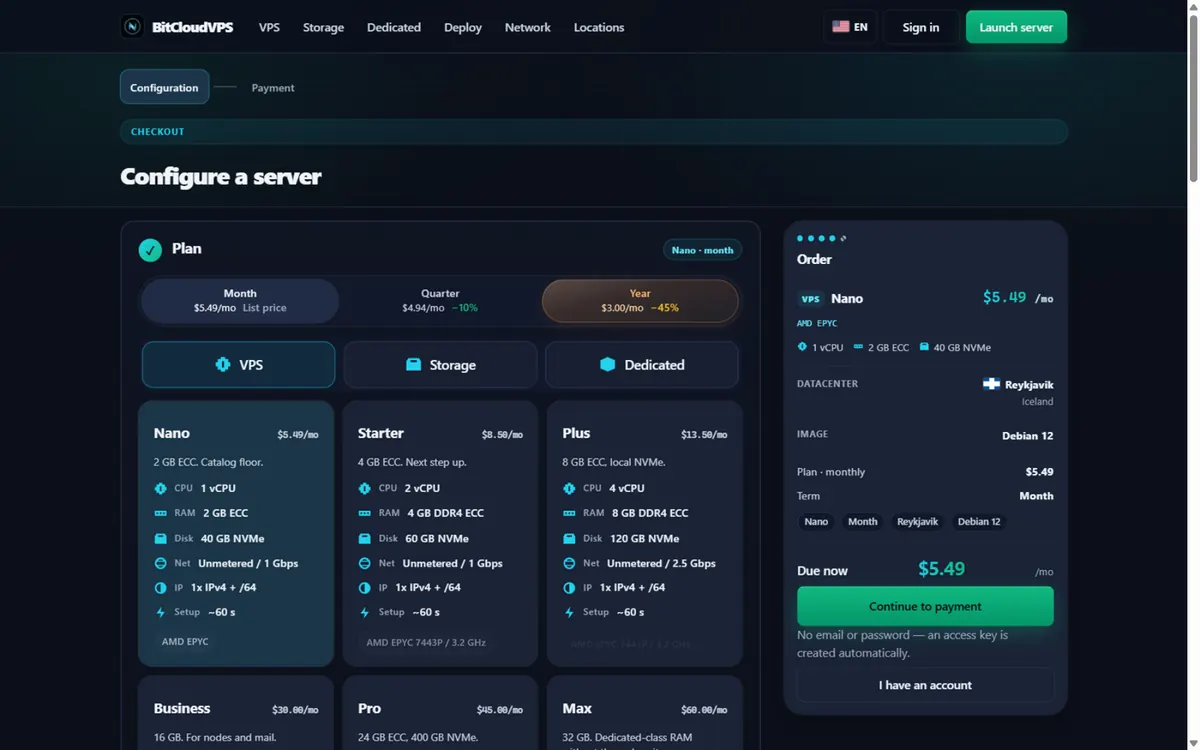
1Pick a plan. Open the deploy page and keep the Year term: Nano is $5.49/mo list and $3.00/mo flat on the annual term. No email and no password are required at any step. 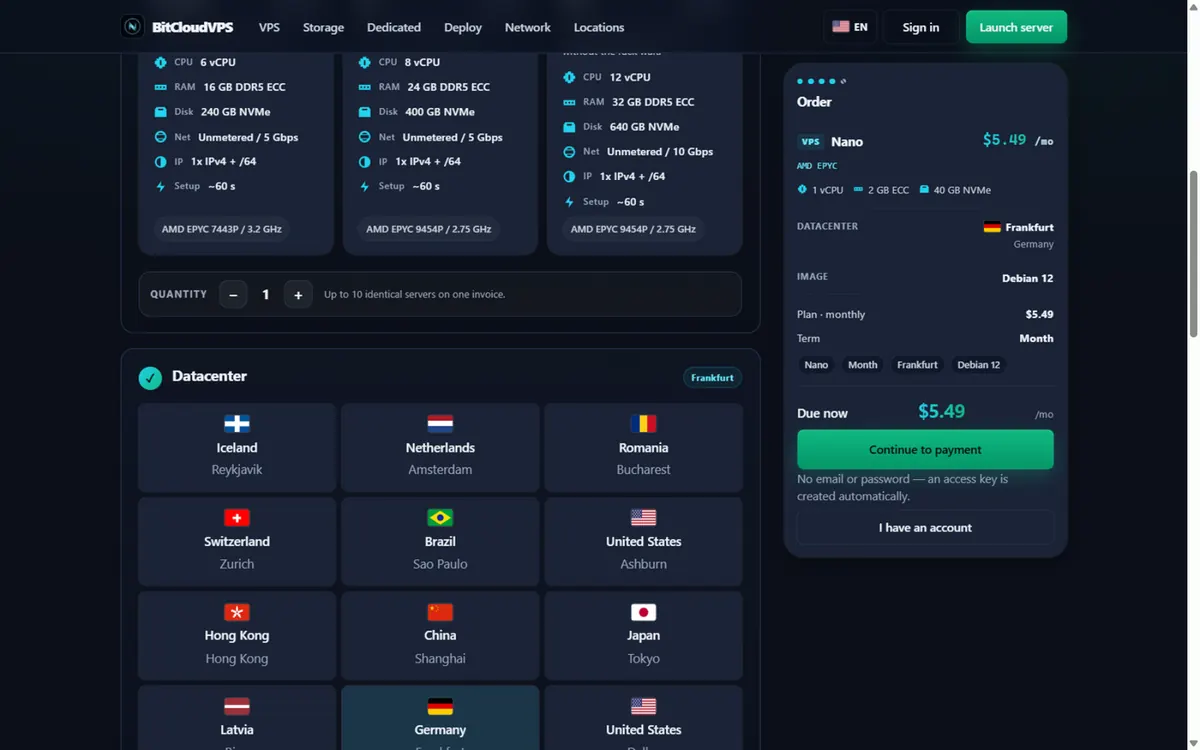
2Choose a datacenter. Click a location: 21 sites from Reykjavik to Singapore share the same price per SKU. This walkthrough selects Frankfurt (DE-CIX, Germany). 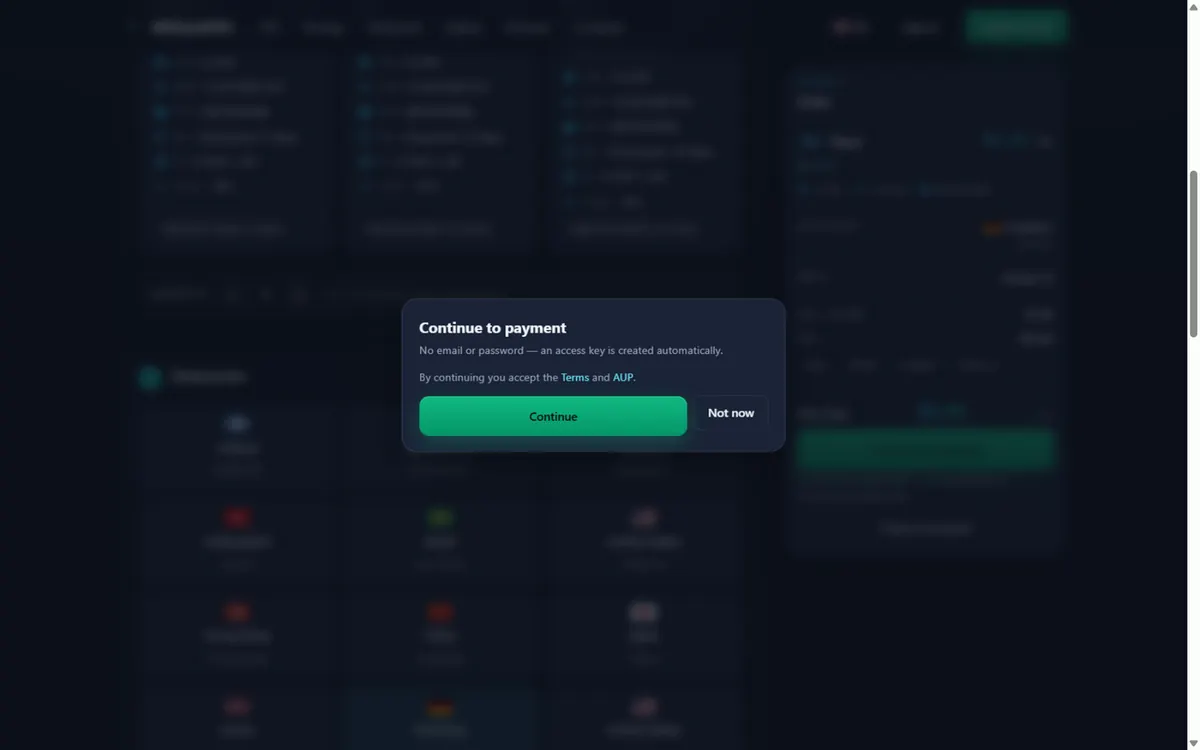
3Continue to payment. Press Continue to payment and accept the Terms and AUP. No email, no password — there is nothing to leak. 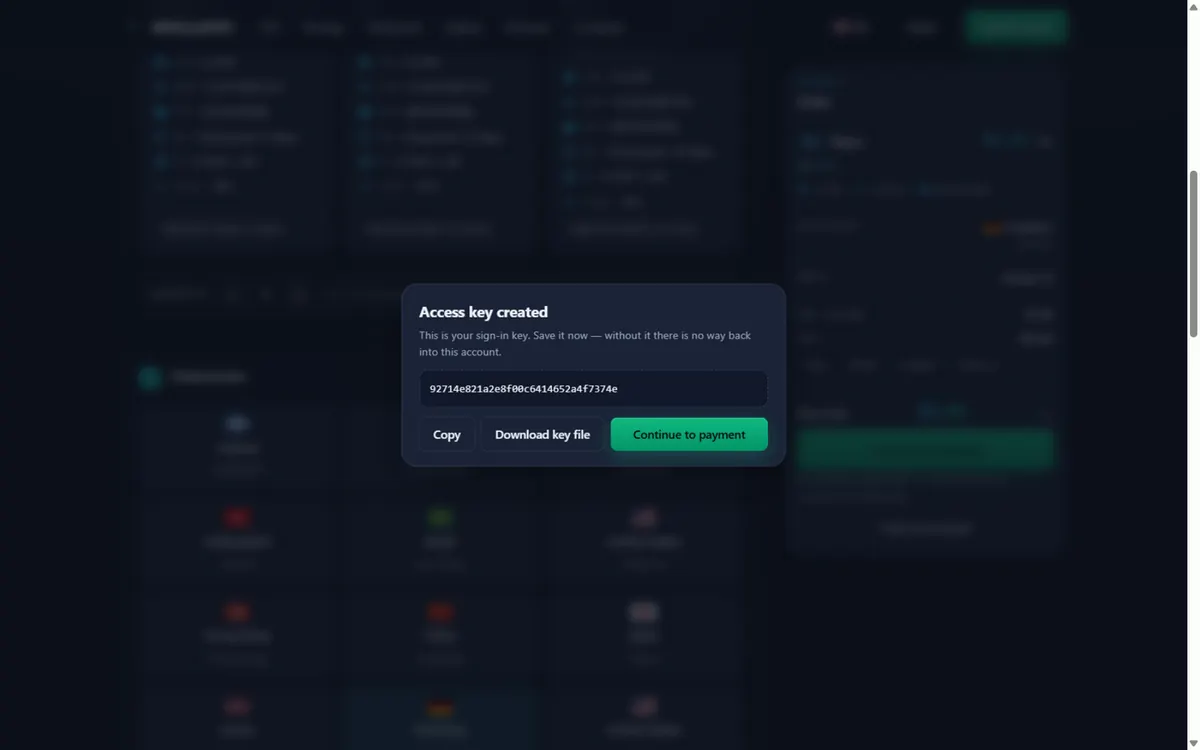
4Save your access key. An anonymous token account is created automatically. Copy or download the access key — it is the only way back into the account. 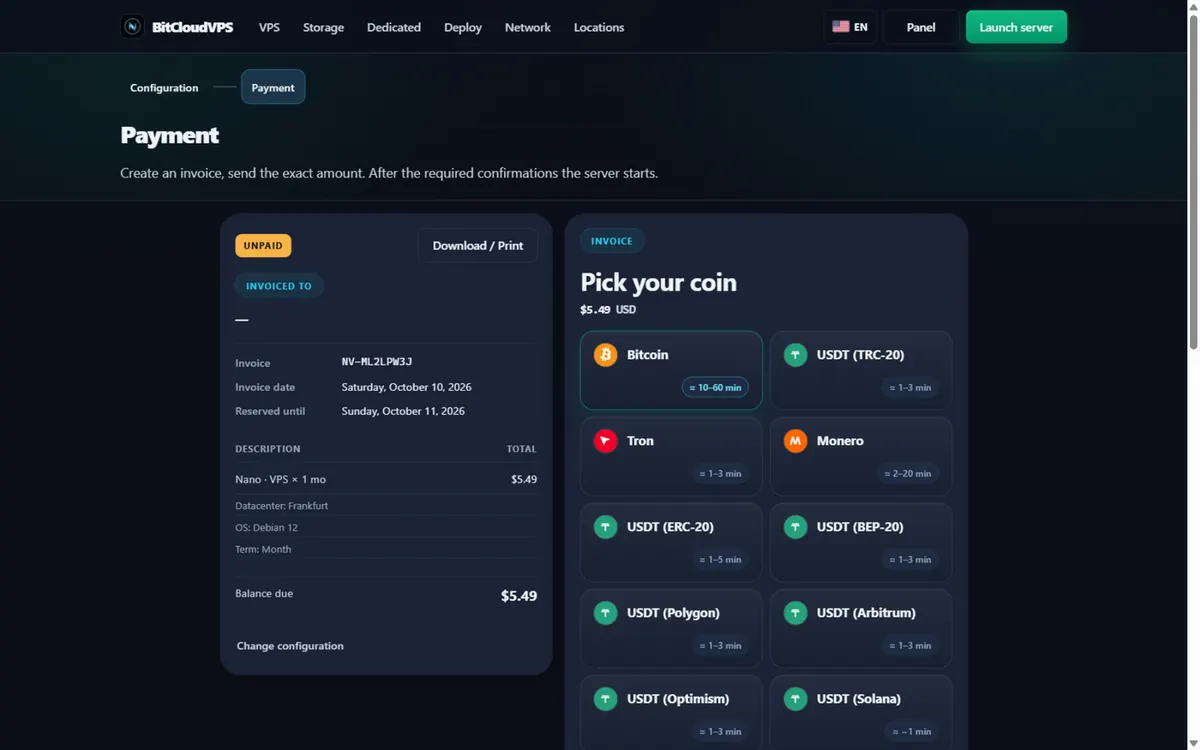
5Pick your coin. The invoice page lists BTC, XMR, LTC, DOGE and USDT on seven networks with live confirmation ETAs. The demo pays in Monero. 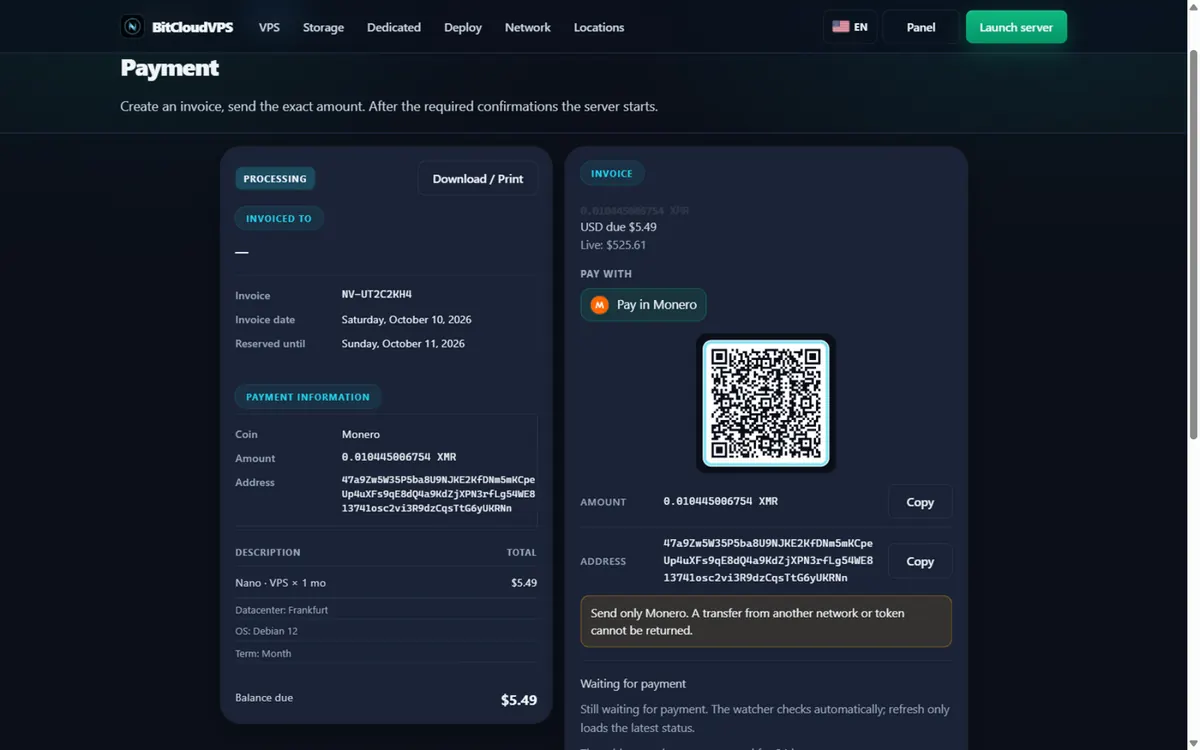
6Send the exact amount. Scan the QR or copy the address and the exact XMR amount. After the required confirmations the watcher credits the invoice automatically. 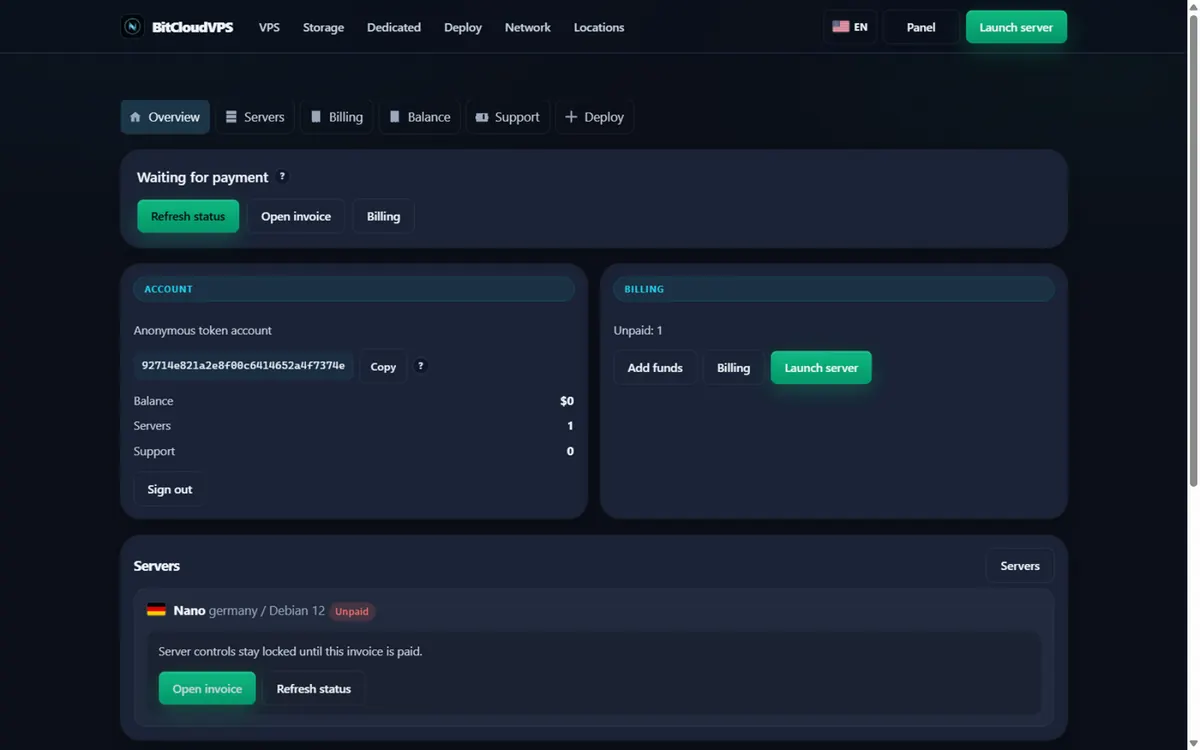
7Track it in the panel. The panel shows the account, the server and the invoice status. Controls unlock as soon as the payment confirms.


Is buying a VPS anonymously legal?
Yes — privacy is legal. What you run must obey criminal law and the AUP.
Do you need my name at all?
No. Email + password; invoice is crypto-only.
BTC or XMR for maximum privacy?
XMR. Bitcoin’s ledger is public forever; Monero hides amount and parties by design.
Should I use Tor for checkout?
If local network observers are in your threat model, yes — it costs nothing to add.
Can I skip a domain entirely?
Yes. Many workloads need only the IP or a private DNS name.
How fast after payment?
VPS-class machines are typically ready about a minute after the crypto payment confirms.
What if I already used my real email?
Create a new alias and new account; treat the old one as burned for anonymity purposes.
Do I need to re-verify my identity when I renew an anonymous VPS?
No. The checkout is no-KYC and a token-only signup is available, so renewals run through the same flow as the first purchase — pay in any of the 19 supported assets (BTC, XMR, USDT on 7 networks, and more) and the server continues without an identity step.
How much should I budget for a complete anonymous stack in 2026?
A working single-operator setup runs roughly $35–$40/month effective: annual Starter at $81.60/yr, a Nano backup exit at $36/yr, and 1 TB storage from $24/mo. Everything from VM to backups fits under $450/year with zero identity steps.
Is prepaying a year safer for privacy than monthly?
Usually yes: the annual term cuts payment events from twelve to one, and each on-chain payment is a data point. The caveat: a large prepaid balance is itself a bigger single record, so prepay long terms only from a clean acquisition path.
What does the host actually know about me?
Whatever you hand over: a signup token, an optional email address, the invoice you paid and the service traffic. No ID documents, no phone number, no KYC step exists to hand anything else over.
What won't an anonymous VPS protect against?
Self-inflicted links: personal logins from a home IP, leaked cookies, services that publish your address, and on-chain patterns that tie wallets together. The server removes one identifier; it does not fix operational mistakes.
Primary sources
Ready to launch?
Configure a VPS or dedicated server, set a password, then pay the invoice.
Network
Edge RTT
Uptime · 36h
Complaints · 36h