 BitCloudVPS
Sign up without an email — token-only VPS
Open a BitCloudVPS account with a 32-character token. No inbox, no ID, crypto invoice. Save the token; we cannot email a reset. Deploy from $3/mo.
Open a BitCloudVPS account with a 32-character token. No inbox, no ID, crypto invoice. Save the token; we cannot email a reset. Deploy from $3/mo.
What you get instead of an inbox
Most “no KYC” hosts still store an email. That string is a recovery handle, a subpoena target, and a breach correlator. BitCloudVPS lets you skip it: the panel identity is a 32-character hex token. Optional email exists if you want invoice mail. Token-only is the stronger path.
This is not magic invisibility. We still see the invoice (coin, amount, address, txid) and short-lived connection metadata. Read limits of no-KYC and how anonymous BitCloudVPS is.
Business $24/mo (6 vCPU / 16 GB DDR5) is the production size. Crypto invoice, no KYC.
Launch nowSteps
- Open deploy. Choose token-only (no email).
- The panel shows the token once. Save it in a password manager or encrypted note like a seed. If you lose it, we cannot reset it — there is no inbox to write to.
- Pick Nano ($3, 1 vCPU / 2 GB / 40 GB NVMe) or Starter ($6.80, 2 vCPU / 4 GB / 60 GB). Same list price in all twenty-one locations.
- Pay the live-rate invoice: XMR when the payment trail matters; USDT-TRC20 when you want a dollar amount. BTC, ETH, BNB, SOL, LTC, TRX, XRP, DOGE, DASH, ADA, GRAM (TON) also work.
- SSH with a key. Empty comment on the key:
ssh-keygen -t ed25519 -C "".
Create a token-only account
Deploy nowVs Impreza / ServPrivate / Servury
They sell the same idea (client ID / 32-char credential / no recovery). BitCloudVPS adds twenty-one locations, dedicated from $79.50, USDT on seven networks, and an agent path (x402 USDC on Base). Ranking of no-inbox hosts: best no-email VPS.
Short answer: yes, an account with no email at all
You can create and run a full BitCloudVPS account without ever entering an email address: signup is token-only, the token is the account, and the email field is optional at every stage, including payments and renewals. Nothing in the checkout, deployment or billing flow requires a mailbox - invoices live in the panel, payment confirmations are on-chain, and server credentials appear in your account dashboard rather than in a welcome message.
What you give up is the convenience layer that email quietly provides: password recovery, renewal reminders and provider notifications all become your responsibility. The rest of this guide is about running that trade deliberately - getting the account created, proving no mail trail exists, handling recovery and renewals without an inbox, and hardening the token that is now your single point of failure.
What token-only signup changes at each layer of the account
An email address is not just a contact detail - providers use it as identity, as a recovery factor and as a notification channel, and each of those uses has privacy consequences. Removing it changes all three layers at once, which is why the account works differently rather than just being quieter.
- Identity layer. Your account is a random token generated at signup. No name is required, no phone, no address; if you never add an email, the provider's records contain a token, server metadata and payment history. That is the whole profile.
- Recovery layer. There is no "forgot password" email because there is no address to send one to. The token in your possession is the proof of ownership; losing it means losing the account, which is why the backup procedure below matters more than any password here.
- Notification layer. Expiry warnings, abuse tickets, maintenance notices - all arrive in the panel instead of a mailbox. If you are used to learning about an expiry from an email three days before it happens, change the habit: check the panel on a schedule, or you will discover renewals after they lapse.
The payment layer is unchanged by choice of email: it is crypto-only either way, across 19 assets, so the mailbox was never a payment credential here. That is the honest scope of the feature - it deletes one identifier completely, and it makes you the owner of two jobs the mailbox used to do.
Prerequisites: what to prepare before you create a no-email account
A token-only account shifts several chores from the provider's infrastructure to your own habits, so the preparation is less about technology and more about not locking yourself out. Work through the table before you click create - each row exists because its absence is a real support ticket we cannot actually solve for you.
| Prepare | Why | Consequence if skipped |
|---|---|---|
| A password manager entry for the token | The token is unrecoverable; it needs a durable home from minute one | Lost token = lost account and servers, no reset path |
| An offline backup of the token | Password managers fail; paper in a safe does not need electricity | Single copy in one tool is a single point of failure |
| A renewal calendar entry | No email reminder will come | Server expires silently; IP and data release |
| A funded balance or chosen coin | 19 assets accepted; funding before deploy makes signup one session | Splitting signup and payment across days adds unnecessary friction |
| Your SSH keys ready | Server access is by key from the panel, not by emailed credentials | Scrambling to generate keys mid-deployment |
One more decision worth making up front: whether this account stays email-free forever or you may attach an address later. Both work - the field is optional, not forbidden - but the cleanest privacy posture is deciding now, because an address added casually in month six quietly rebuilds the trail you removed at signup.
Step by step: from token to a running server in one session
The whole flow is a single sitting: account, funding, deployment, first login, and no mailbox is involved at any point. What follows is the sequence with the details that trip people up on their first no-email account.
- Open signup and choose the token path. The form asks for nothing identifying; the token is generated and shown once. Save it to the password manager immediately, then make the offline copy - do not defer this to "later".
- Pick the plan and location. Prices are identical across all 21 sites; Nano at $5.49/mo list ($36/yr flat) is the entry, Starter at $8.50 is the default for real workloads.
- Fund and pay in the same session: BTC, XMR, USDT on seven networks, and 16 other assets. On-chain confirmation credits the invoice; there is no confirmation email to wait for.
- Deployment takes about a minute after payment clears. The panel shows the assigned IPv4, and the root password or key setup lives in the dashboard - screenshot or copy it now, because this is the other thing that does not get emailed.
- Log in over SSH from your terminal, and do the first-session hardening immediately: key-based auth, disable password root login, firewall everything except what you need.
- Set your own renewal reminder for three days before the period ends - a calendar entry with the plan, amount and coin. This calendar entry replaces the entire notification inbox of a normal hosting account.
How to verify there is no email trail on your account
Verification has two sides: what the provider holds, and what your own devices and networks leaked. The first side is quick - the account profile with no attached email contains a token, your plan and payment records; there is no verification code to request and no welcome message to check, and that absence is itself the confirmation. The useful audit is the second side, because no-email signup does not automatically make the rest of the session invisible.
- Check the browser session: sign up over Tor or a VPN, not your daily browser profile, or your IP attaches to the account creation regardless of the missing email. The account dashboard shows no client IP history either way - assume the network sees what the provider does not.
- Check the payment path: every on-chain payment is public. XMR breaks the link between wallet and invoice; BTC, ETH and the USDT networks do not. The email-free account does not undo a transparent chain.
- Check your own DNS: a misconfigured system resolver or a browser doing background DNS prefetch during signup can leak the domains you visited to your ISP. Tor Browser with default settings closes this; a regular browser over VPN usually does.
- Check future sessions: the value of no-email signup compounds only if every later login follows the same network discipline. One login from your home IP on a maintenance emergency re-associates the token with that address in any observer's logs.
Recovery, renewals and backups when there is no mailbox to catch you
Everything the email used to do now needs a deliberate substitute, and the substitutes are all cheap - the failure mode is forgetting the substitute exists. Recovery is the big one: the token is the account, full stop. A support request cannot restore a lost token, because "prove you are the person with no identity attached" has no answer that would not also let anyone claim any account. So the backup discipline is non-negotiable: token in the password manager, printed copy in a physical location, and - if the account matters - a second encrypted copy stored apart from the first two. Rehearse the restore once: recover from the backup copy into a fresh manager entry, confirm it is legible and complete.
Renewals are the second substitution. With no expiry reminders, run the calendar system from the setup section: an entry per server, three days ahead, with the coin and amount. If you hold multiple servers, an account balance funded ahead of time collapses several renewals into one invoiceless top-up - bonus tiers apply at $1,000 (+10%) and $2,000 (+40%) - and reduces the number of dates you must remember to the number of top-ups. Server-side backups matter more here too: expiry after a forgotten renewal releases the machine, and whatever existed only on its disk is gone. Backup off-box weekly to the storage line (1-5 TB NVMe at $24-$56/mo) or to your own machine, and the worst case of a lapsed renewal becomes an inconvenience rather than a data-loss event.
Hardening a token-only account: the token is the crown jewel
Threat model shifts when the token is everything: an attacker does not need your password, your email or your phone - only the string. Harden accordingly. First, treat the token like a private key, because that is what it is: never paste it into a chat, a ticket or a screenshot; support will never ask for it. Second, protect the sessions that use it - log in from dedicated browser profiles or Tor Browser, and log out; a persistent session in a daily browser is a copy of the token sitting in cookie storage waiting for the next malware run.
Third, segment by blast radius. One token holding your whole infrastructure is one leaked string away from everything; two or three accounts, each holding one class of server, cap the damage of any single leak. The cost is a few extra renewals to track, which the calendar system absorbs. Fourth, watch the interaction with payments: funding a balance concentrates value behind one token, which is convenient and raises the stakes - the $2,000 (+40%) tier and the $1,000 (+10%) tier are only worth using if the token's storage discipline is already proven. Fifth, decide your inheritance story. An account with no email and no identity is unrecoverable by anyone but the token holder; if your death or incapacity would strand servers someone else needs, the token backup must exist somewhere your plan can reach. None of this is hosted-side security - it is all yours, which is the actual price of the privacy.
BitCloudVPS · token-only signup · no email, no ID · from $5.49/mo
Create your no-email accountToken rotation and project separation: running several no-email accounts safely
The direct answer: with no mailbox tying accounts together, your discipline shifts to token hygiene and deliberate project separation — one account per project, one token per account, rotated on your schedule rather than leaked on someone else's.
Create the separation on purpose. A second account for a second project keeps invoices, servers and failure blast radius partitioned: if one project's account is compromised or its payment method is correlated, the other project's boxes are untouched. Signup works with a token only and email is optional on every tier, so nothing in the catalog nudges you to consolidate. What consolidation quietly costs you shows up in correlations: same-token logins from the same IP, same-coin renewals across 'separate' projects, one balance funding all of them. Split the token storage as well as the accounts — a password manager vault per project, or an offline copy for the account you only touch at renewal time. Rotate a token when its project changes hands or after any login from a machine you did not fully control; treat rotation like a key rotation, with the old token dead the moment the new one works. And keep the recovery story straight before you need it: no email means no reset link exists, so the offline token copy is not paranoia, it is the only recovery channel there is — the troubleshooting matrix above covers what a missed renewal does to running servers, and it is not forgiving.
One honest boundary: separation at the account layer does not automatically separate you at the payment or IP layer. If a project needs the wallet, the withdrawal address and the login IP to be different too, make those choices explicitly — different coin or USDT network, different coin source, a clean IP — because the account system cannot do that part for you.
Replacing what email used to do: alerts, invoices and cron on a mailbox-less account
The direct answer: an email address silently ran four jobs — notifications, receipts, password resets and monitoring — and each has a concrete replacement on a no-email account; set them up in your first session, before the first renewal date, not after the first surprise.
Notifications: the panel keeps order, provisioning and billing status in-account, so the habit is checking the dashboard on a schedule you own — or better, pointing your own monitoring at the infrastructure. A $5.49 Nano can run a tiny cron that probes your production boxes' ports and pushes to a Telegram bot or an ntfy topic; that watchdog is now outside both your infrastructure and any mailbox a provider might send to. Receipts and invoices remain downloadable in-account, which satisfies bookkeeping without any inbox — export them on the same monthly cron if accounting needs an archive. Password resets: there is no reset link without an email, by design — the token is the credential, which is why the hardening section above treats its storage as the whole game. Server-level mail (cron output, fail2ban reports, cert expiry notices from your own services) goes to a mailbox you control independently, or gets routed to a log drain; do not leave cron mailing root on the box with nowhere to go, because that queue fills a small NVMe faster than you would expect. Finally, renewal risk: without a 'your card will be charged' email, the renewal date lives only in your calendar. Put it there manually at deploy time, or pre-fund the account balance — top-up bonus tiers apply at $1,000 (+10%) and $2,000 (+40%) — so renewals settle from balance even if the date slips.
The email-free account, step by step and consequence by consequence
Signing up without an email here is not a workaround — it is a first-class flow. The account is created by a token: a credential generated at signup, which together with your password is the entire key set. The email field can simply be left empty; nothing downstream requires it. From there the order proceeds through the standard checkout — any of 19 assets from BTC and XMR through GRAM and USDT on seven networks — and the VM provisions in about sixty seconds with its dedicated IPv4, /64 IPv6, and unmetered 1–10 Gbps port, at any of 21 racks and any tier from the flat $36/yr Nano to the dedicated ladder. Harborline Node Ltd., Saint Kitts and Nevis, is the operator of record; at no step does an address, card, or document enter the picture.
The consequences deserve their own paragraph because they are the cost side of the trade. Recovery: with no email there is no reset link — lose the token and password and the account is gone, so store them offline with the seriousness of a wallet seed; that severity is the design, not an oversight, because a recoverable account is a provable account. Notifications: renewals and invoices will not chase you, so calendar the term yourself — the −20% annual discount is the common choice and a year arrives quickly. Second factors and alerts: choose app-based mechanisms, and route any service-level notifications (uptime alerts, payment confirmations) through identities created for the purpose. What is gained is equally concrete: no server anywhere holds an address linking this hosting to a person, the account cannot be enumerated through a breach of some other service's email list, and the hosting layer of your operational map stays empty of correlation edges. For a $36 Nano year, testing the whole flow costs less than the coffee you drink while doing it.
Where the limits are (October 2026)
Keep the threat model precise. Anonymous-adjacent hosting removes the host-side identity trail: token-only signup, optional email, no KYC review, crypto invoices that record a txid rather than a name. It does not blind the host to traffic it must carry, it does not make a logged-in panel session anonymous, and it does not protect workloads that identify themselves — an admin login from your home IP defeats the whole design. Exact limits of no-KYC anonymity. OPSEC guide. Full checklist. Payment-side note: chain analysis happens on public blockchains, not at the host. Coin choice and network choice are your OPSEC knobs, and the checkout keeps 19 of them open.
How to sign up and deploy — step by step
How to sign up and deploy — step by step
No email, no password: an access key is created at checkout and the invoice clears in crypto. Desktop shots below; phones get the mobile UI.
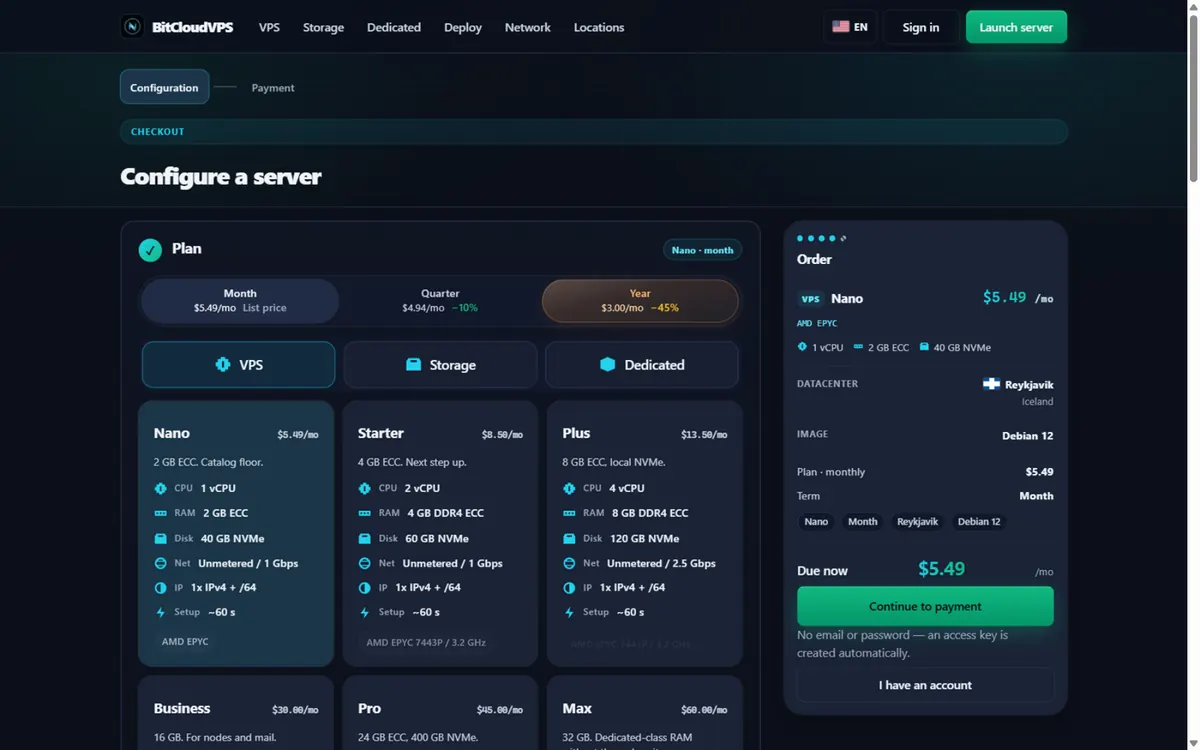
1Pick a plan. Open the deploy page and keep the Year term: Nano is $5.49/mo list and $3.00/mo flat on the annual term. No email and no password are required at any step. 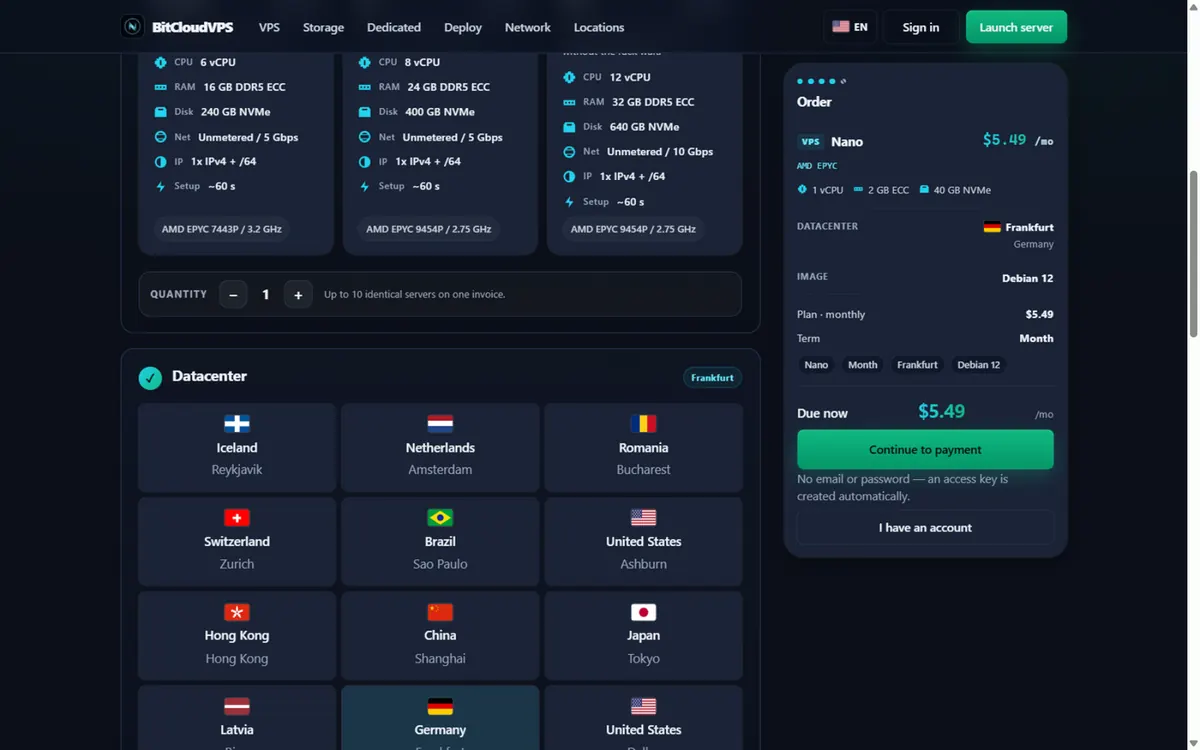
2Choose a datacenter. Click a location: 21 sites from Reykjavik to Singapore share the same price per SKU. This walkthrough selects Frankfurt (DE-CIX, Germany). 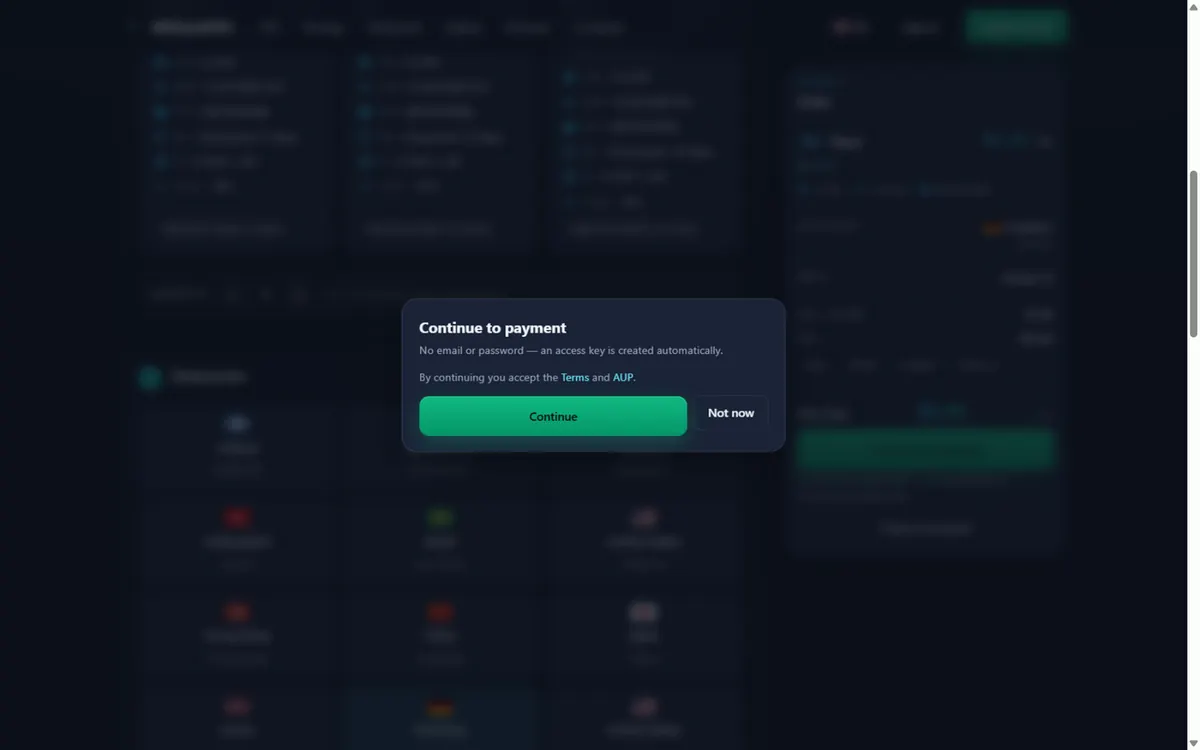
3Continue to payment. Press Continue to payment and accept the Terms and AUP. No email, no password — there is nothing to leak. 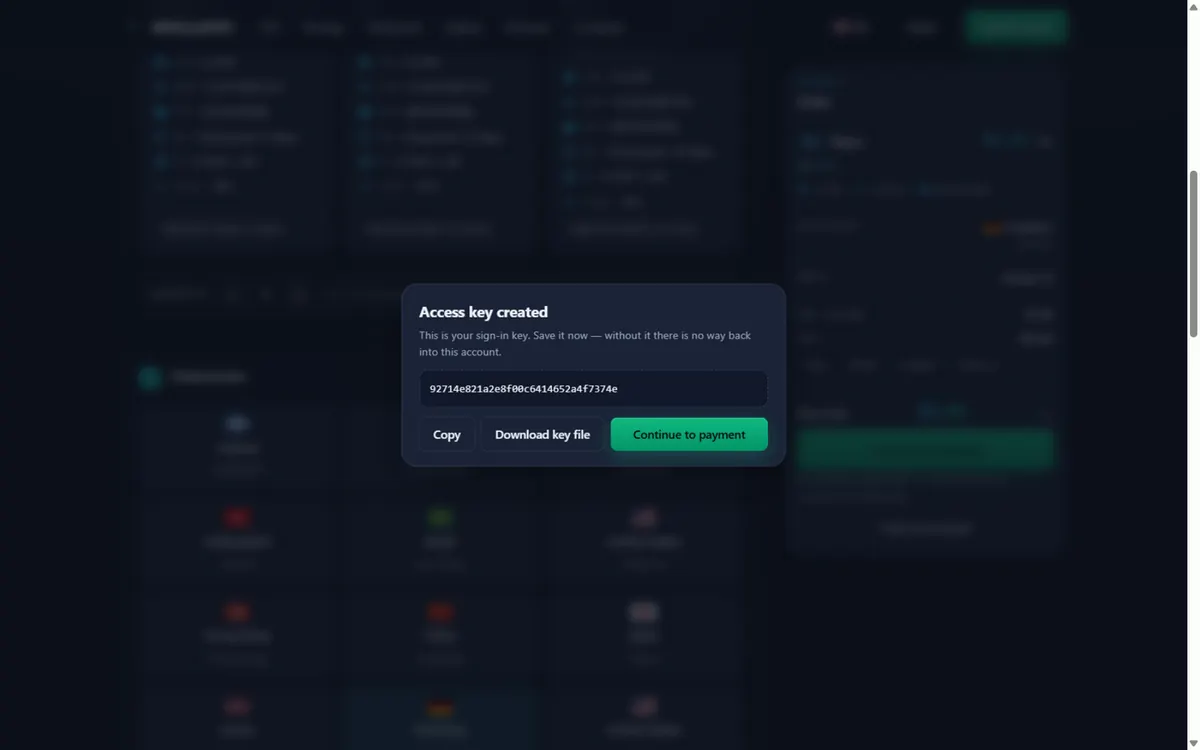
4Save your access key. An anonymous token account is created automatically. Copy or download the access key — it is the only way back into the account. 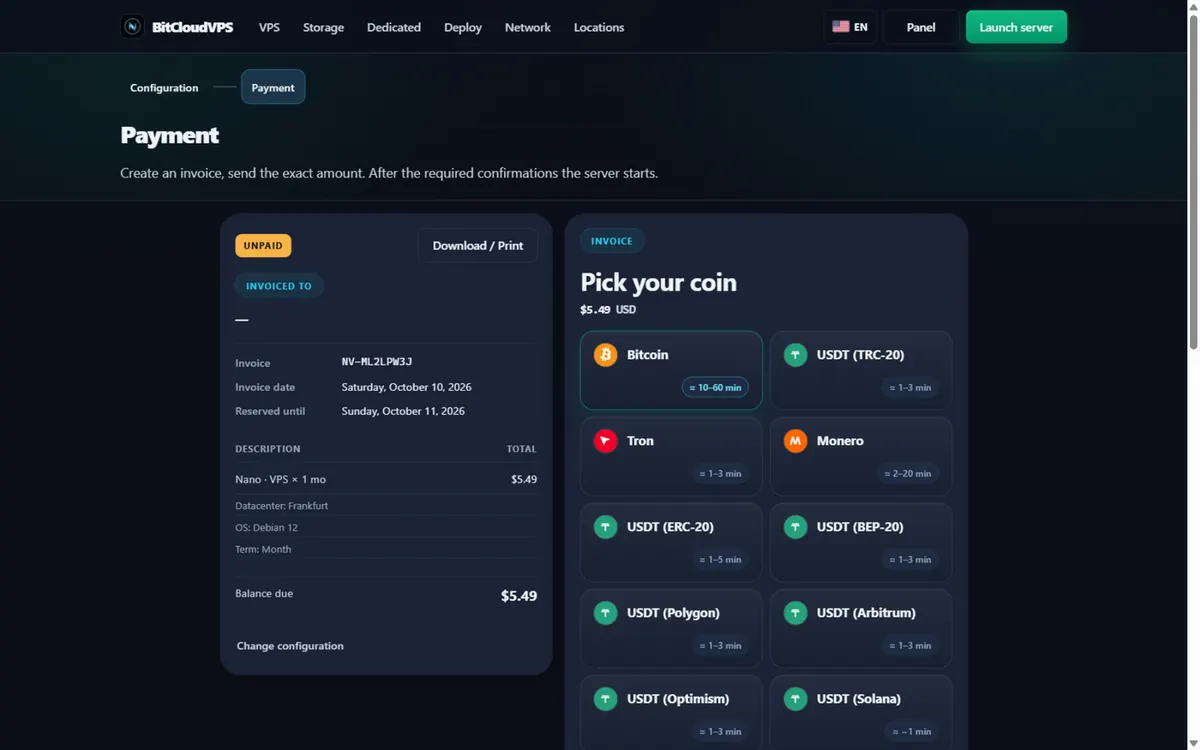
5Pick your coin. The invoice page lists BTC, XMR, LTC, DOGE and USDT on seven networks with live confirmation ETAs. The demo pays in Monero. 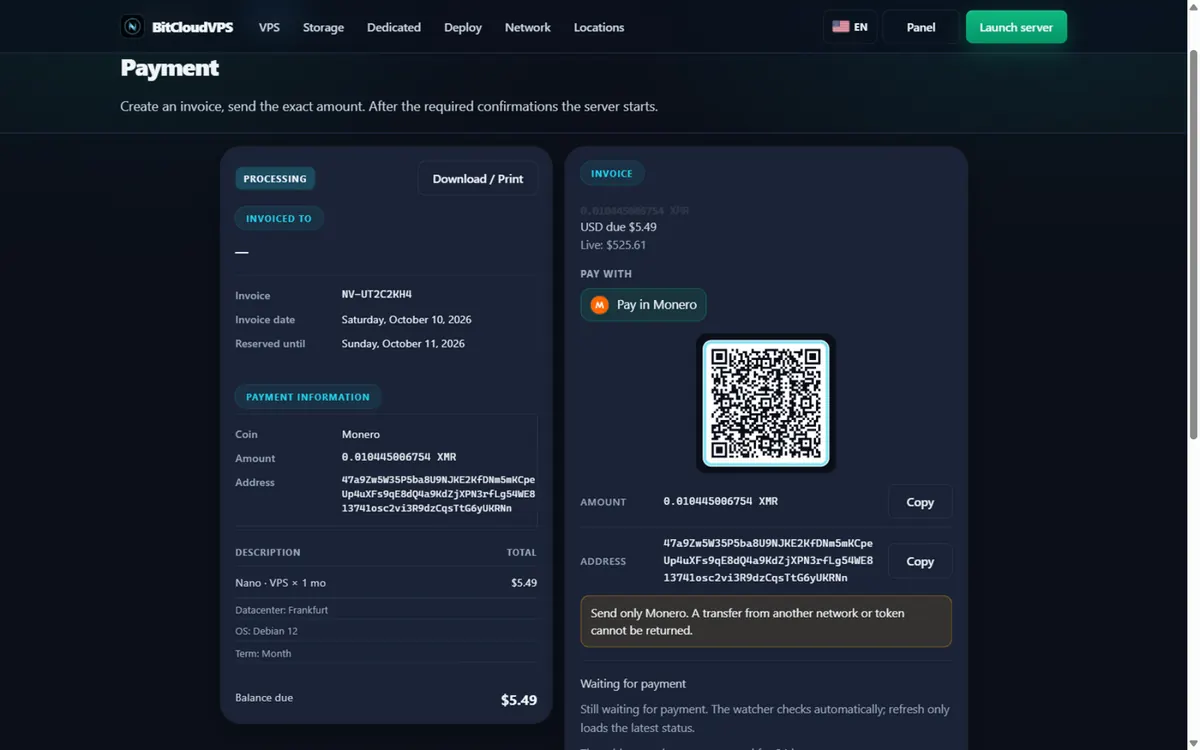
6Send the exact amount. Scan the QR or copy the address and the exact XMR amount. After the required confirmations the watcher credits the invoice automatically. 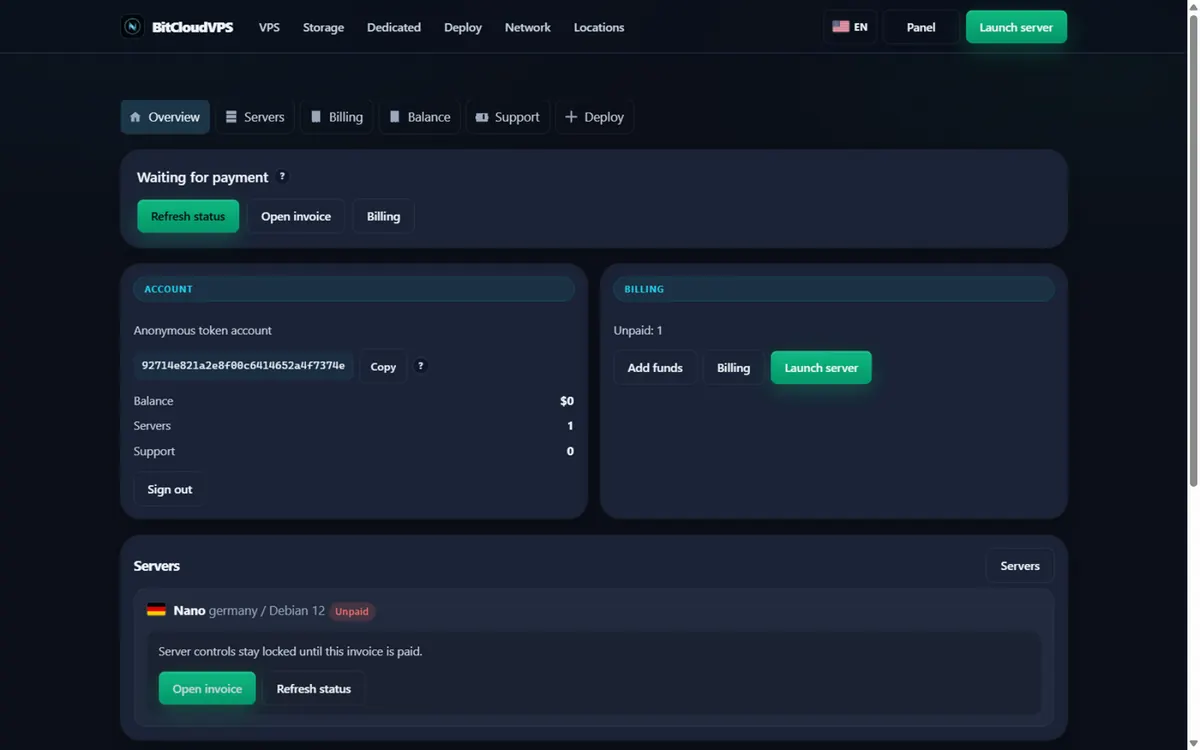
7Track it in the panel. The panel shows the account, the server and the invoice status. Controls unlock as soon as the payment confirms.


Can you email me a new token?
No. Token-only means we do not hold an inbox. Store the token before you close the tab.
Can I attach email later?
Yes, optional. The token remains a login secret.
Is token-only the same as no-KYC?
No-KYC is no passport. Token-only is no inbox. BitCloudVPS does both.
Can I create multiple no-email accounts for different projects?
Yes, and it is good practice: separate tokens cap the blast radius if one leaks. Each account pays its own invoices in crypto independently, and nothing links the accounts on our side beyond payment-chain analysis, which you control through coin and wallet choice.
Do I get invoices or receipts without an email on file?
Yes, inside the panel: each invoice is generated and stored in your account with its payment status and transaction reference. Nothing is emailed, so export anything you need for your own records directly from the dashboard.
What happens to servers if I lose the token and miss a renewal?
The account lapses at period end and the server is released with its data, like any expired plan. This is the worst case of token loss plus no calendar, which is why the offline token backup and renewal reminders exist as a pair.
Is signup without email enough to make the VPS anonymous?
It removes one identifier, not all observers. Your network path, payment chain and server behavior remain. Pair token signup with paying in a private asset, accessing over Tor, and separating identities - the account layer is one part of the stack, not the whole answer.
Can two no-email accounts share one funding source without linking together?
Not automatically — the same coin, same wallet and same network across accounts is an on-chain correlation no account system can hide. If separation matters for a project, vary the payment asset or network (19 assets are supported, including XMR and USDT on seven chains) and fund each account from the source you intend it to be seen with.
What does BitCloudVPS still see if I sign up without an email?
Token-only signup removes the email string, not all observability. We still see the invoice — coin, amount, address, txid — and short-lived connection metadata. Your panel identity is a 32-character hex token shown once at signup, so store it in a password manager.
What does the host actually know about me?
Whatever you hand over: a signup token, an optional email address, the invoice you paid and the service traffic. No ID documents, no phone number, no KYC step exists to hand anything else over.
What won't an anonymous VPS protect against?
Self-inflicted links: personal logins from a home IP, leaked cookies, services that publish your address, and on-chain patterns that tie wallets together. The server removes one identifier; it does not fix operational mistakes.
Primary sources
Ready to launch?
Configure a VPS or dedicated server, set a password, then pay the invoice.
Network
Edge RTT
Uptime · 36h
Complaints · 36h